
New to MTM—or Looking to Learn More About Your Benefits?
We’re glad you’re here—welcome to MTM! Whether you’re brand new to the company or a long‑time employee, our MTM Benefits & Wellness Hub is designed to support you and your family at every stage.
At MTM, we truly care about your well‑being and the well‑being of the people you love. Our benefits are built to support your health, financial security, and overall wellness journey—from day one and throughout your time at MTM. Use this site to explore your benefits, understand your options, and find guidance for real‑life moments whenever you need it.
Getting started with your MTM benefits is easy.
Here’s how to learn about your options and complete your enrollment:
Explore Your Benefits
Review each of the benefit sections on this site to learn about your medical, dental, vision, pharmacy, financial, and wellness resources. Each section includes clear summaries to help you understand what’s offered. To help you understand which medical plan is best for you, click on the Plan Comparison tool linked on this page.
Watch the video titled ‘Your Benefits at MTM’.
Review Enrollment Deadlines
New hires have a limited window to enroll in benefits—be sure to submit your enrollment in Workday including all required dependent documents within 30-days of your hire date.
Log In to Workday
When you’re ready to make your choices, log in to Workday and follow the enrollment steps. You’ll be able to compare plans, add dependents, and finalize your elections.
Need Help? We’re Here for You
If you have questions or want help understanding your options, reach out to the Benefits Team anytime by logging a Help Ticket in Workday. We are happy to help.
Eligibility and Waiting Period
Eligibility
As an MTM employee, you are eligible for most benefits if you are scheduled to work at least 40 hours per week (30 hours per week for medical benefits). The exception to that is for the 401(k) Retirement Plan and Employee Assistance Plan, which are both eligible to all employees regardless of the hours you work.
The benefits you select during your new hire enrollment will remain in effect for the remainder of the calendar year. If you experience a Qualified Life Event (QLE), you may make a change in your enrollment(s) consistent with the event. For example, if you have a baby, you may enroll your baby in coverage when they are born. For more information on QLEs and the required enrollment timing, click on the link in the Learn More section.
Waiting Period
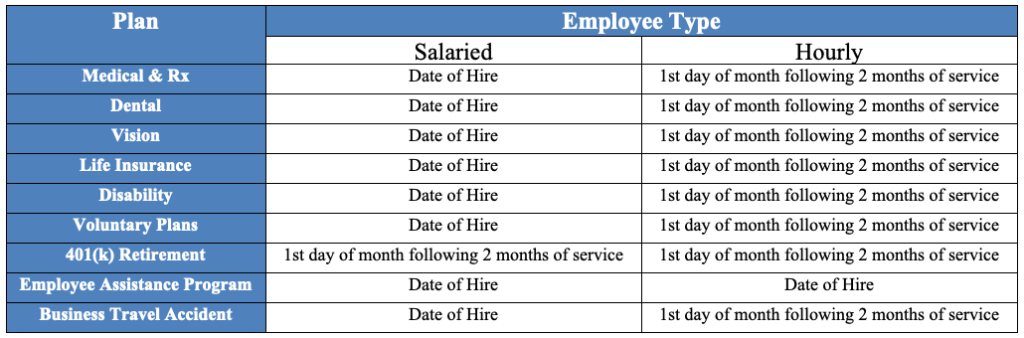
The waiting period for benefits varies based on your employee type and benefit plan. Review the chart below for details.
Qualified Dependents
You may enroll your eligible dependents for coverage once you are eligible. Your eligible dependents include:
Your legally married spouse
Your children up to age 26 (biological, adopted, step, those under your legal guardianship)
Disabled children may be covered after age 26 with appropriate documentation
Dependent Verification
If you are enrolling a dependent in a health plan, you must submit dependent proof as follows:
For Legal Spouse:
Marriage Certificate
For Children:
Biological Child: Birth Certificate
Adopted Child: Birth Certificate or Adoption Certificate or Placement Agreement
Stepchild: Birth Certificate AND the spouse document
Guardianship: Birth Certificate AND court order document of guardianship
Disabled Child: Documentation listed above AND documentation required per the Health Plan
Documentation must be scanned and uploaded in Workday and submitted with your enrollment election. Failure to provide the required documentation will result in your dependent not being enrolled in coverage.
If you have questions or want help understanding your options, reach out to the Benefits Team anytime by logging in to Workday and submitting a Help Ticket. We are happy to help.
Learn More
- Plan Comparison Tool
- Video – Comparing Medical Plans in English and Spanish
- Qualified Life Events
- Video – Qualifying Life Events in English and Spanish
- Workday Aid: Changing Benefits during a Qualified Life Event
- Workday Aid: How to Add or Remove a Beneficiary in Workday
- Workday Aid: Benefit Enrollment Instructions